Hello and thanks for posting.
Quoting phxarchitect,
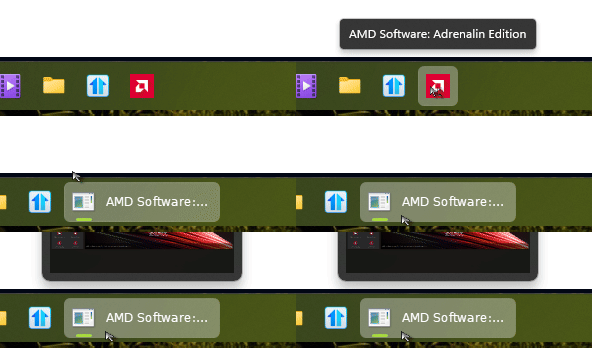
I'm having an issue with 2 apps currently (AMD Adrenalin Edition and BitWarden) where the app icons appear correct in the start menu and if pinned to either the start menu or the task manager but upon opening the apps the correct icon is replaced with a generic system icon. This only occurs if I'm using the enhanced taskbar, if i turn it off both icons return to their correct form.
End of phxarchitect's quote
I'm not seeing this reproduce from the latest BitWarden desktop app (version 2026.7.0), nor my AMD software. Some more information should help to isolate what may be different:
Can you try unpinning the apps from both the Start menu and Taskbar, then pinning to the Taskbar again?
If it continues to be a problem, the exact steps used to pin these apps may be relevant.
Does the issue reproduce with Start11v2 reset to default settings, then only enabling the Enhanced Taskbar?
You can save the backup of your settings to a file before trying: Start11 v2 UI: Settings backup.
Are you on a different version of Windows?
I tested with Win11 25H2 (build 26200.9106). You can run winver.exe from start to get this information.
If the issue persists, please clarify the exact steps to pin the apps to your taskbar, your Windows version/build, and any settings changed in addition to enabling Enhanced Taskbar.
Best regards,
Adam McGuinness
Stardock Support Specialist
End of Abisnabidam's quote
Thank you for looking into this, I'm running Windows 11 25H2 26200.9267 but the issue has been persistent over multiple previous windows updates, my apologies as i do not recall exactly when it started but it's been some time now. (I'm also running Object Dock and Deskscapes and should note that I have the registry key enabled for Start11 that hides the windows peak previews from the taskbar) I followed the instructions above with the following results:
I removed the shortcuts from start menu and taskbar, re-added them. I also attempted to create new shortcuts directly from the .exe files being sure to point the icon to the .exe and add them with the same results. I have tried pinning them from the start menu in Start 11, from shortcuts copied from the start menu and from shortcuts that I have created manually with the result being the same each time. To clarify - the icons have always appeared correctly everywhere until the application is run then ONLY the taskbar icon changes to the default system icon, icons in the start menu, icons pinned to the taskbar (but no active running window), icons in the taskbar notifications area and icons in ObjectDock, etc all appear normal all the time. Also, the issue presents itself whether icons are pinned to the start or taskbar or not.
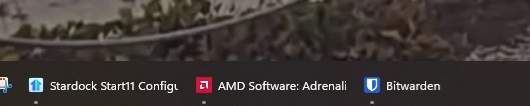
I rest settings to default and received the same result - Everything works great with the enhanced taskbar turned off but changes to the default system icon when turning enhanced taskbar back on (all other settings remained at default). Please see attached screen shots taken during the test.
If it helps - Doing some research online I see that there may be a known issue with apps packaged with Electron Builder that have conflicts with Start11 and that there is a known compatibility issue with Adrenalin noted in Stardock internal reference ODNT-7213
Thanks again for your help!
End of phxarchitect's quote
Forgot to attach the screenshots:
Default Settings:
Default Settings w/ Advanced taskbar turned on:

Hello and thanks for posting.
Quoting phxarchitect,
I'm having an issue with 2 apps currently (AMD Adrenalin Edition and BitWarden) where the app icons appear correct in the start menu and if pinned to either the start menu or the task manager but upon opening the apps the correct icon is replaced with a generic system icon. This only occurs if I'm using the enhanced taskbar, if i turn it off both icons return to their correct form.
End of phxarchitect's quote
I'm not seeing this reproduce from the latest BitWarden desktop app (version 2026.7.0), nor my AMD software. Some more information should help to isolate what may be different:
Can you try unpinning the apps from both the Start menu and Taskbar, then pinning to the Taskbar again?
If it continues to be a problem, the exact steps used to pin these apps may be relevant.
Does the issue reproduce with Start11v2 reset to default settings, then only enabling the Enhanced Taskbar?
You can save the backup of your settings to a file before trying: Start11 v2 UI: Settings backup.
Are you on a different version of Windows?
I tested with Win11 25H2 (build 26200.9106). You can run winver.exe from start to get this information.
If the issue persists, please clarify the exact steps to pin the apps to your taskbar, your Windows version/build, and any settings changed in addition to enabling Enhanced Taskbar.
Best regards,
Adam McGuinness
Stardock Support Specialist
End of Abisnabidam's quote
Thank you for looking into this, I'm running Windows 11 25H2 26200.9267 but the issue has been persistent over multiple previous windows updates, my apologies as i do not recall exactly when it started but it's been some time now. (I'm also running Object Dock and Deskscapes and should note that I have the registry key enabled for Start11 that hides the windows peak previews from the taskbar) I followed the instructions above with the following results:
I removed the shortcuts from start menu and taskbar, re-added them. I also attempted to create new shortcuts directly from the .exe files being sure to point the icon to the .exe and add them with the same results. I have tried pinning them from the start menu in Start 11, from shortcuts copied from the start menu and from shortcuts that I have created manually with the result being the same each time. To clarify - the icons have always appeared correctly everywhere until the application is run then ONLY the taskbar icon changes to the default system icon, icons in the start menu, icons pinned to the taskbar (but no active running window), icons in the taskbar notifications area and icons in ObjectDock, etc all appear normal all the time. Also, the issue presents itself whether icons are pinned to the start or taskbar or not.
I rest settings to default and received the same result - Everything works great with the enhanced taskbar turned off but changes to the default system icon when turning enhanced taskbar back on (all other settings remained at default). Please see attached screen shots taken during the test.
If it helps - Doing some research online I see that there may be a known issue with apps packaged with Electron Builder that have conflicts with Start11 and that there is a known compatibility issue with Adrenalin noted in Stardock internal reference ODNT-7213
Thanks again for your help!




 Stardock Forums