

Stop Fences 6 startup at Windows boot

How do I stop Fences 6 from starting automatically?  I used Task Manager and disabled the 2 Fences lines, closed and restarted Windows but Fences still opens although it says disabled in Task Manager.
367 views 2 replies
Reply #1 Top

Hello,

Sorry to hear you are having issues. I have forwarded your problem/question to Stardock Support Team for their assistance. Please keep an eye on this thread for any updates. We appreciate your feedback and patience. Thank you.

Basj,

Stardock Community  Assistant

Reply #2 Top

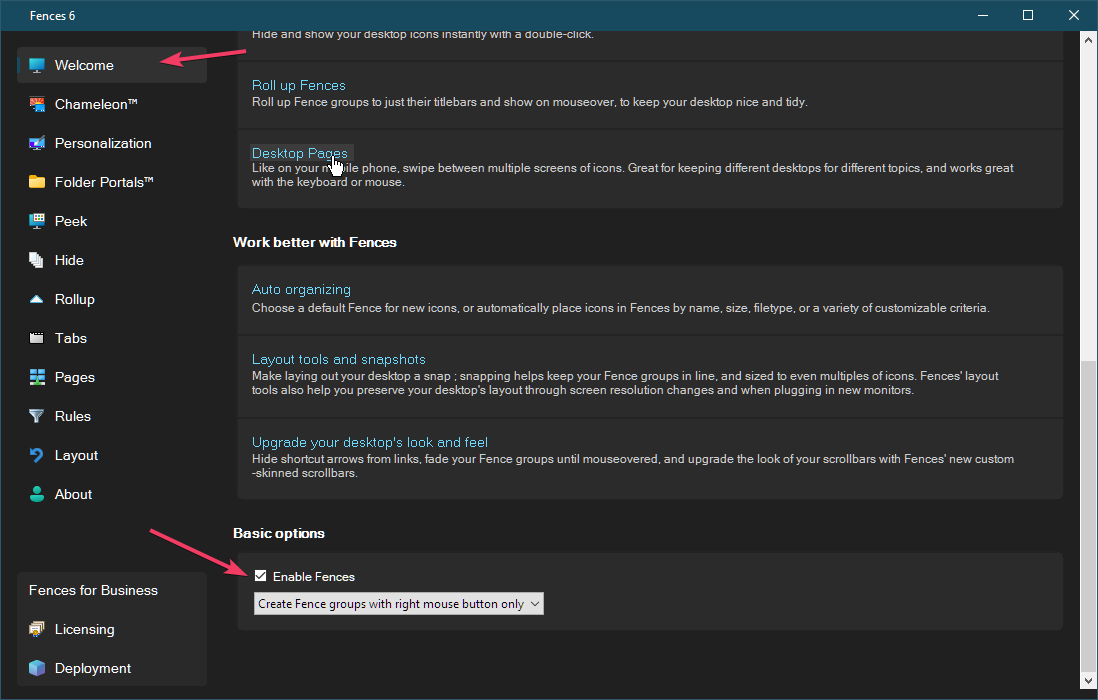
You can manage this using the Enable/Disable option in Fences (found at the bottom of the Welcome screen).

  • If you hit Disable, Fences won’t load again until you manually re‑enable it.

  • The bootloader may still appear in Startup, but it uses almost no system resources.

  • Once re‑enabled, it stays active until you disable it again.

There isn’t a way to keep it permanently off without toggling it yourself.


Thank you,

Basj,

Stardock Community Assistant