Please try these steps:
1. Go to the following directory:
- C:\Program Files (x86)\Stardock\Fences
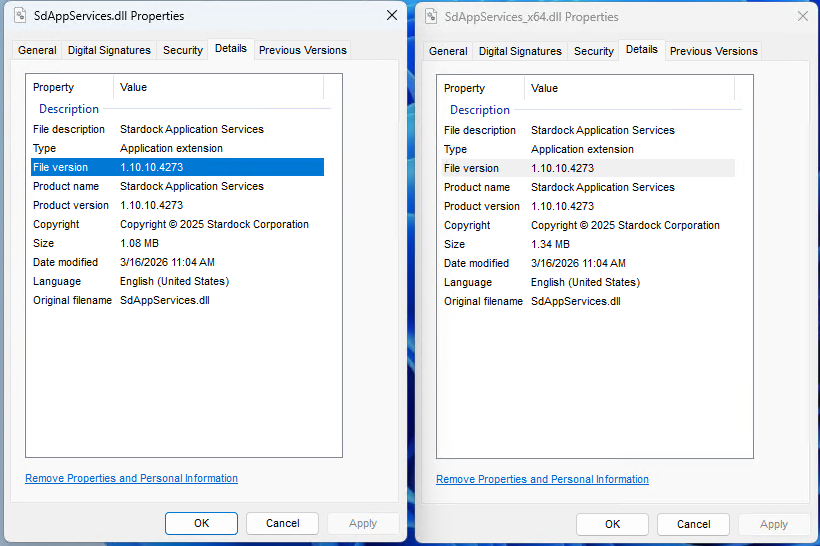
2. Locate these two files: SdAppServices.dll and SdAppServices_x64.dll
3. Right click each -> Properties -> Details tab and take note of the File version. It should be 1.10.10.4273:
3. If it is not, disable Fences from loading via Task Manager -> Startup tab:
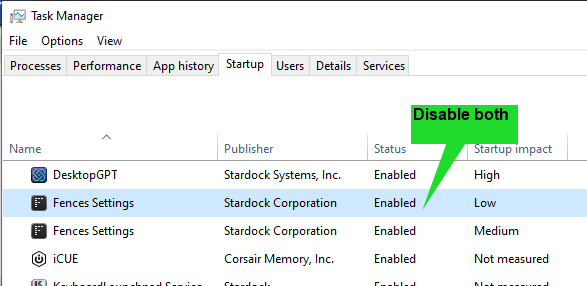
4. Reboot your PC, Fences should not start.
5. Download this zip file and extract it:
6. Copy its 2 files to this directory (replace whatever is currently there):
- C:\Program Files (x86)\Stardock\Fences
7. Enable both Fences startup items in Task Manager.
8. Reboot again, then test the restoration of a layout.
Please let us know if this resolves this.
Best regards,
Adam McGuinness
Stardock Support Specialist


 Stardock Forums


 .
.