Twilight v1.91 released

Fixes some buglets / missing stuff

Just a head's up that we released an update earlier today that fixes the text issues and the custom opponent window.


It's on either SDC or Impulse.

15,126 views 18 replies
Reply #1 Top
Thanks Brad!

-HM
Reply #2 Top
Ijust downloaded the update and the string not found errors are still present. See my other post for details.
Reply #3 Top
Ha Haaaa! Yes! Custom Opponents is working fine now. Thanks Brad!
Reply #4 Top
Yeah, I can alt tab to the desktop and come back again!! Also, its nice to have ion beams back for the korath.
Reply #5 Top

Ijust downloaded the update and the string not found errors are still present. See my other post for details.
End of quote

Right now we're at a loss as to what would cause that.

I would almost suggest a full reinstall of everything from scratch and delete the gc2twilight directory from \my documents\my games


Reply #6 Top
Custom Opponents working for me, too, now. Thanks so much for the quick fix!
Reply #7 Top
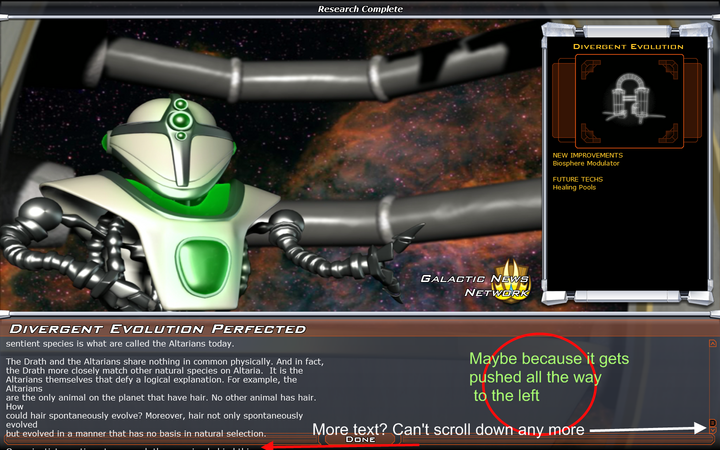
Hmm, the custom opponents works now and Altarian tech tree is in place, but some of the descriptions when you research them seem to be shifted to the left, i.e. in a column to the left and not reaching all the way to the right. I also suspect that some of it spills beneath the window and is not reachable by the scroll button. I say this because I could see a few lines beneath the tech description window when scrolled all the way down. This happened when researching the Precursor history part of the tech tree. I will try to get a screenshot and I hope it's not only me.
Reply #8 Top
Yeah works fine now, but I had created 3 custom races already and now they wont show up at all.
Reply #9 Top
Yes, I think they got deleted somehow, 'cause mine was gone as well. You can make them again, though, so not a huge problem.
Reply #10 Top
True not that difficult to replace, done it already actually :), but I checked the My Documents\My Games\GC2TwilightArnor folder first just to see if they had been deleted and they were still there. Not a problem though just an observation that I thought was a bit odd. Anyway thanks for the quite patch Stardock.
Reply #11 Top
I'm also getting the "string not found"-problems. I did absolutely clean install (uninstall with SDC, removed all game dirs and My Games-stuff) but the problem still persists. :( Running Vista if that makes any difference.
Reply #12 Top
I'm running Vista. I also went in and unchecked anything that was listed as "string not found" and have had no problems as yet.
Reply #13 Top
A most welcomed fix for anyone familiar with custom race playfield setups... not to neglect though is the new naming convention; previous version (DA#25) had those as "*.customracexml" while (TA#27) saves them as "*.raceconfigxml" (not to be confused with "*.raceconfig" from DL) -- just to make sure we can't mixup the newest with bad or absent call lines.
Bof, it's okay... it's just a matter of copy-paste carefully the whole 39 races of X-Worlds and adapt them to the TotA features and tech-trees.

I'm still boggled down though why the actual mod paths aren't taken into account when the multiple customs pick their graphics from specific locations;

- If they are located in the Install folder, the call_lines are again being re-written as to indicate the proper path & original location.
- The *My Documents/...* is once more the default structure and any multiple races baring the common #12 must be located in that root also for proper operation. Indirectly that is.
- And unless, the normal principles of a true Total_Conversion are applied to a Mod (via the regular method with "Raceconfig.xml" for 0to12 listings), there is no other way around distributing multiple races (such as mine) without enforcing manual edits of the race_files by downloaders.

Disappointing, but it's alright. I understand.
Solid and stable stuff, nevertheless so far.

PS: It takes such a looooong time to build a Terror Star, i almost went in as cheat-mode just to try it out - but, i fought the temptation as to ruin the cream pie effect once i legally can inflict ONE final blast to crush the darn Drengins who are - as we speak - driving me nuts, up the walls and off to the races for proper defenses! :)
Reply #14 Top
Zy, just don't fleet it with another ship before you save your game, 'cause you are gonna get disappointed (https://forums.galciv2.com/310692/). Wait for another fix for protecting those buggers :)
Reply #15 Top
I too uninstalled GC2 and all the files related in mygames and progrm files. I then reinstalled the game in entirety and found the exact same string not found errors. I'm running Vista and had no problems with String Not Found on my XP machine That would be two uninstalls of TOA and 1 uninstall of GC2, DA, and TOA.

I'm feeling pretty lucky that I have an XP machine that runs GC2 well, although about two hours into a game the turn button greyed out and wouldn't come back. I did get a save game though.

Hope this helps in some way. And I appreciate Stardock's and Frogboy's hard work!
Reply #16 Top
No problems here and I'm running Vista. As I am sure many are. Better to first figure where the problem is before making it an XP/Vista issue.

Reply #17 Top

I'm also suffering the "string not found" problem.  I also did a full reinstall (from Impulse, since SDC was giving me the endless loop problem) on Vista, but with no luck.  I'm remembering to delete the My Games Twilight directory every time.  Weird...

Reply #18 Top
I managed to get the screenshot for the Tech description problem I was talking about, this time in the Drath tech tree (is it my idea or are the two trees the same, except for war profiteering??? And why do Altarians have Drathian Temples?!)